# Staking

#### Step 1: Connect wallet

Click “Connect Wallet” on the right side of the screen to connect your wallet (MetaMask, Rabby Wallet, Coinbase Wallet, Gate Wallet, OKX Wallet, Bitget Wallet, Binance Wallet, Wallet Connect).

<figure><img src="https://1987302139-files.gitbook.io/~/files/v0/b/gitbook-x-prod.appspot.com/o/spaces%2FhUFeSYPJDEOtT5FxR8pX%2Fuploads%2FlL4l1M7xTahR05XesKkl%2F2.1.png?alt=media&#x26;token=c0abe887-e80f-4118-82da-b563033d7eca" alt=""><figcaption></figcaption></figure>

#### Step 2: Select “Hype Staking” on the homepage

<figure><img src="https://1987302139-files.gitbook.io/~/files/v0/b/gitbook-x-prod.appspot.com/o/spaces%2FhUFeSYPJDEOtT5FxR8pX%2Fuploads%2FL3J9yzYbDeWjhCpIkrPf%2F21.png?alt=media&#x26;token=fe7a28de-45f9-4a91-986f-331445b8e98c" alt=""><figcaption></figcaption></figure>

#### Step 3: Select Staking on HyperCore or HyperEVM

<figure><img src="https://1987302139-files.gitbook.io/~/files/v0/b/gitbook-x-prod.appspot.com/o/spaces%2FhUFeSYPJDEOtT5FxR8pX%2Fuploads%2F0khcl2icN8b3V9weHKfP%2F2.2.png?alt=media&#x26;token=a3209325-b06e-4a7c-a503-54806d70e01b" alt=""><figcaption></figcaption></figure>

## HyperCore Staking

#### Step 4: Click “Enable Trading”

Select “Enable Trading” and accept the terms to proceed.

<figure><img src="https://1987302139-files.gitbook.io/~/files/v0/b/gitbook-x-prod.appspot.com/o/spaces%2FhUFeSYPJDEOtT5FxR8pX%2Fuploads%2FILep86UhtxWMSXrU2gTS%2F2.3.png?alt=media&#x26;token=54e07b23-cdb1-49fb-8a74-315a5d78b559" alt=""><figcaption></figcaption></figure>

<figure><img src="https://1987302139-files.gitbook.io/~/files/v0/b/gitbook-x-prod.appspot.com/o/spaces%2FhUFeSYPJDEOtT5FxR8pX%2Fuploads%2FSDdvxSuTaiUY3cCKUX0s%2F2.4.png?alt=media&#x26;token=cb6aca5a-0995-4a19-8f24-4ac153e8c037" alt=""><figcaption></figcaption></figure>

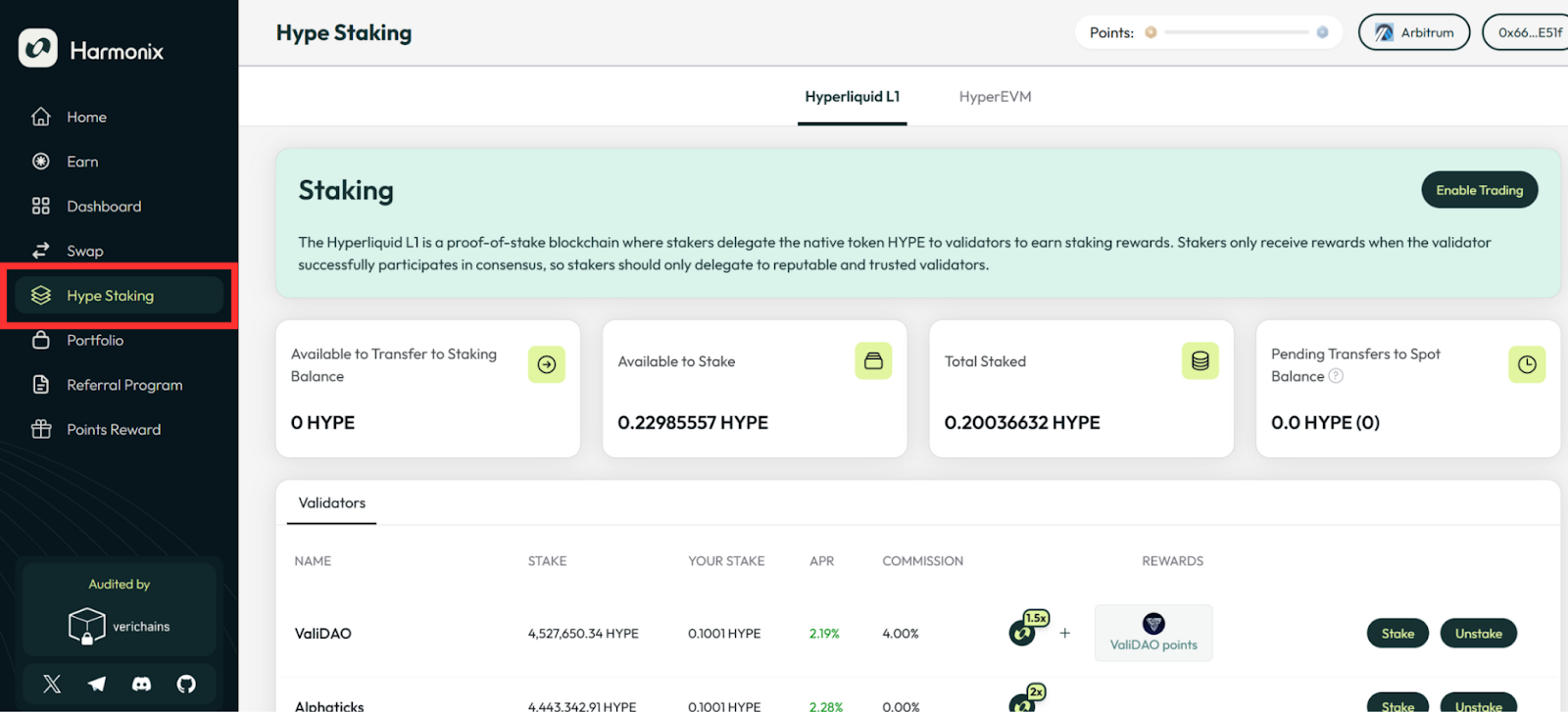
#### Step 5: Check your Staking Balance

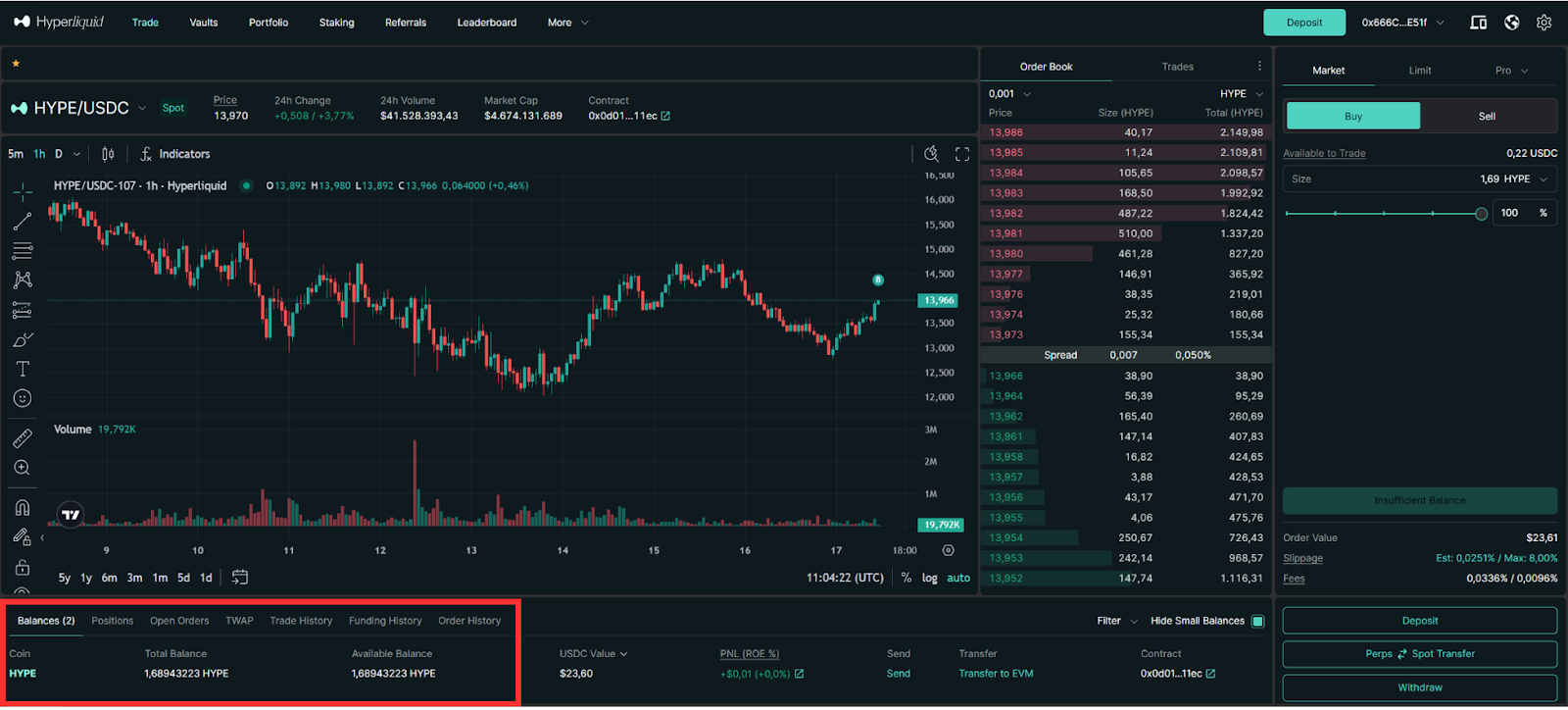
If the "Available to Transfer to Staking Balance" shows 0, check whether the amount of $HYPE in your wallet is in the Spot Balance. You can do this by accessing <https://app.hyperliquid.xyz/> &#x20;

If you don't have any $HYPE, you can purchase as needed.

<figure><img src="https://1987302139-files.gitbook.io/~/files/v0/b/gitbook-x-prod.appspot.com/o/spaces%2FhUFeSYPJDEOtT5FxR8pX%2Fuploads%2FksHXvtofACpbRV1XjXGs%2F25.png?alt=media&#x26;token=dc47723f-d889-4e39-84e2-ce9d2a248a3a" alt=""><figcaption></figcaption></figure>

If your wallet has $HYPE in the Spot Balance on HyperCore, it should display as shown:

<figure><img src="https://1987302139-files.gitbook.io/~/files/v0/b/gitbook-x-prod.appspot.com/o/spaces%2FhUFeSYPJDEOtT5FxR8pX%2Fuploads%2FeV3udXMs4jAt5XV9X93o%2F2.6.png?alt=media&#x26;token=2acf9a3e-8471-4bb7-b7c7-daf9a8ef7e6d" alt=""><figcaption></figcaption></figure>

Harmonix will display the amount of $HYPE under "Available to Transfer to Staking Balance."

<figure><img src="https://1987302139-files.gitbook.io/~/files/v0/b/gitbook-x-prod.appspot.com/o/spaces%2FhUFeSYPJDEOtT5FxR8pX%2Fuploads%2FFDIzxJvi2FEIZQjG8vVJ%2F2.7.png?alt=media&#x26;token=c80cfbb2-5363-4aa7-8078-5fe0e7fa21f2" alt=""><figcaption></figcaption></figure>

#### Step 6: Transfer $HYPE to Staking Balance

To transfer your $HYPE to your Staking Balance, click on "Spot ⇔ Staking Balance Transfer."

<figure><img src="https://1987302139-files.gitbook.io/~/files/v0/b/gitbook-x-prod.appspot.com/o/spaces%2FhUFeSYPJDEOtT5FxR8pX%2Fuploads%2FV8UYIMWNxaJvree541c6%2F2.8.png?alt=media&#x26;token=fd78113e-7563-49a8-911c-59523c8f62cc" alt=""><figcaption></figcaption></figure>

Input the number of $HYPE you want to transfer.

<figure><img src="https://1987302139-files.gitbook.io/~/files/v0/b/gitbook-x-prod.appspot.com/o/spaces%2FhUFeSYPJDEOtT5FxR8pX%2Fuploads%2FgHBaObCGMRsx7w9Jn9b7%2F2.9.png?alt=media&#x26;token=b685fefe-9d5b-4c2a-9654-427f3bda7c8e" alt=""><figcaption></figcaption></figure>

If your transfer is successful, there will be a notification. Then check your "Available to Stake" to see if your balance is displayed correctly.

<figure><img src="https://1987302139-files.gitbook.io/~/files/v0/b/gitbook-x-prod.appspot.com/o/spaces%2FhUFeSYPJDEOtT5FxR8pX%2Fuploads%2Fskex3DEIB0Q1kBNEZIe2%2F2.10.png?alt=media&#x26;token=28c81e01-4ee9-4c29-9d07-a4c0762def17" alt=""><figcaption></figcaption></figure>

#### Step 7: Staking $HYPE on HyperCore

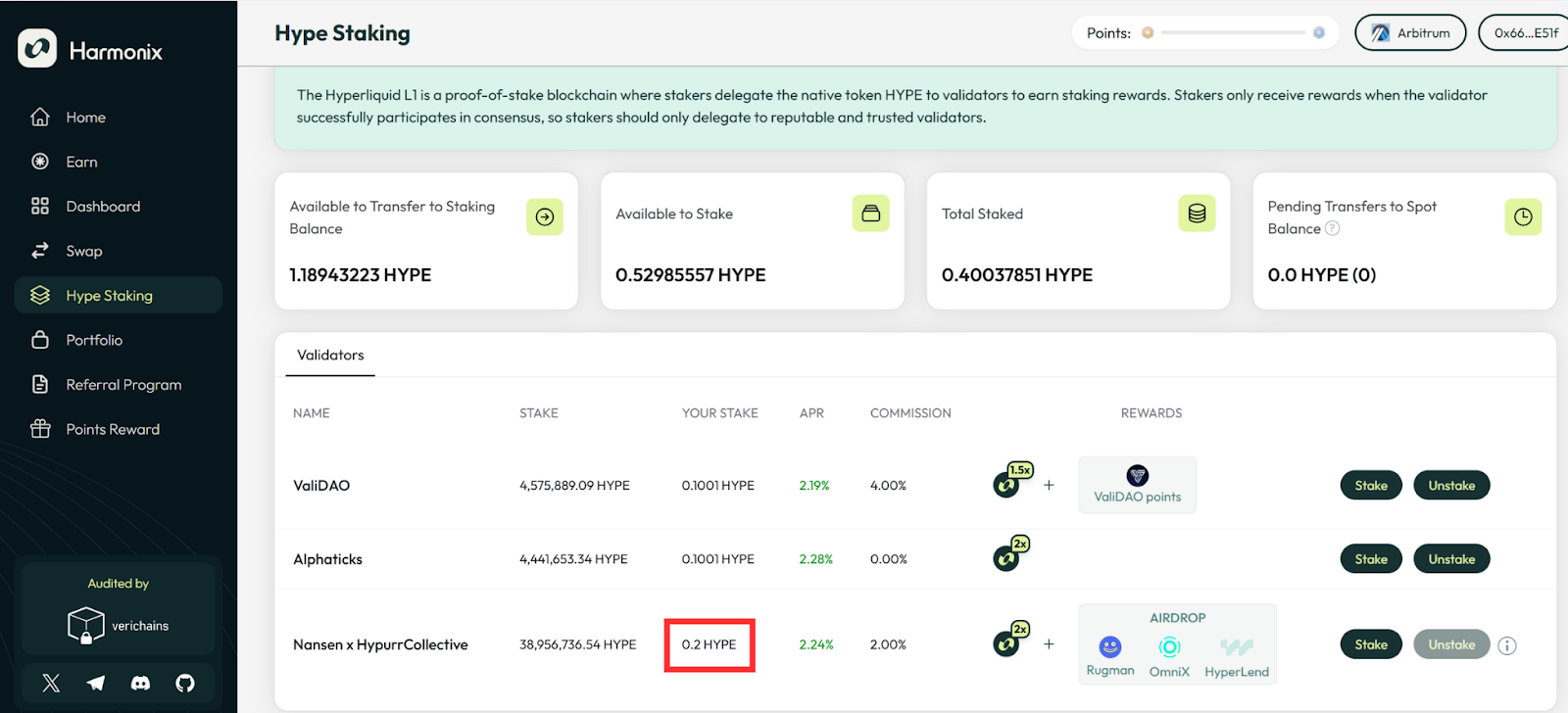
Select your preferred validator and click the "Stake" button.

<figure><img src="https://1987302139-files.gitbook.io/~/files/v0/b/gitbook-x-prod.appspot.com/o/spaces%2FhUFeSYPJDEOtT5FxR8pX%2Fuploads%2FIKMUq0ncSIfczuTVxb1Q%2F2.11.png?alt=media&#x26;token=33deabe0-6671-4c18-a2a2-51428d461568" alt=""><figcaption></figcaption></figure>

Input the number of $HYPE you want to stake.

<figure><img src="https://1987302139-files.gitbook.io/~/files/v0/b/gitbook-x-prod.appspot.com/o/spaces%2FhUFeSYPJDEOtT5FxR8pX%2Fuploads%2FuzJysGDgPTNDS6S8CBML%2F2.12.png?alt=media&#x26;token=3a80c75d-4d3f-49c9-a110-b0e5c9aa3101" alt=""><figcaption></figcaption></figure>

Check “Your Stake" to see if your balance is displayed correctly.

<figure><img src="https://1987302139-files.gitbook.io/~/files/v0/b/gitbook-x-prod.appspot.com/o/spaces%2FhUFeSYPJDEOtT5FxR8pX%2Fuploads%2F4tIZHoZAiuQ4Rp11GnyK%2F2.13.png?alt=media&#x26;token=0f21f753-a686-4548-9538-7f7698aa36c7" alt=""><figcaption></figcaption></figure>

## HyperEVM Staking

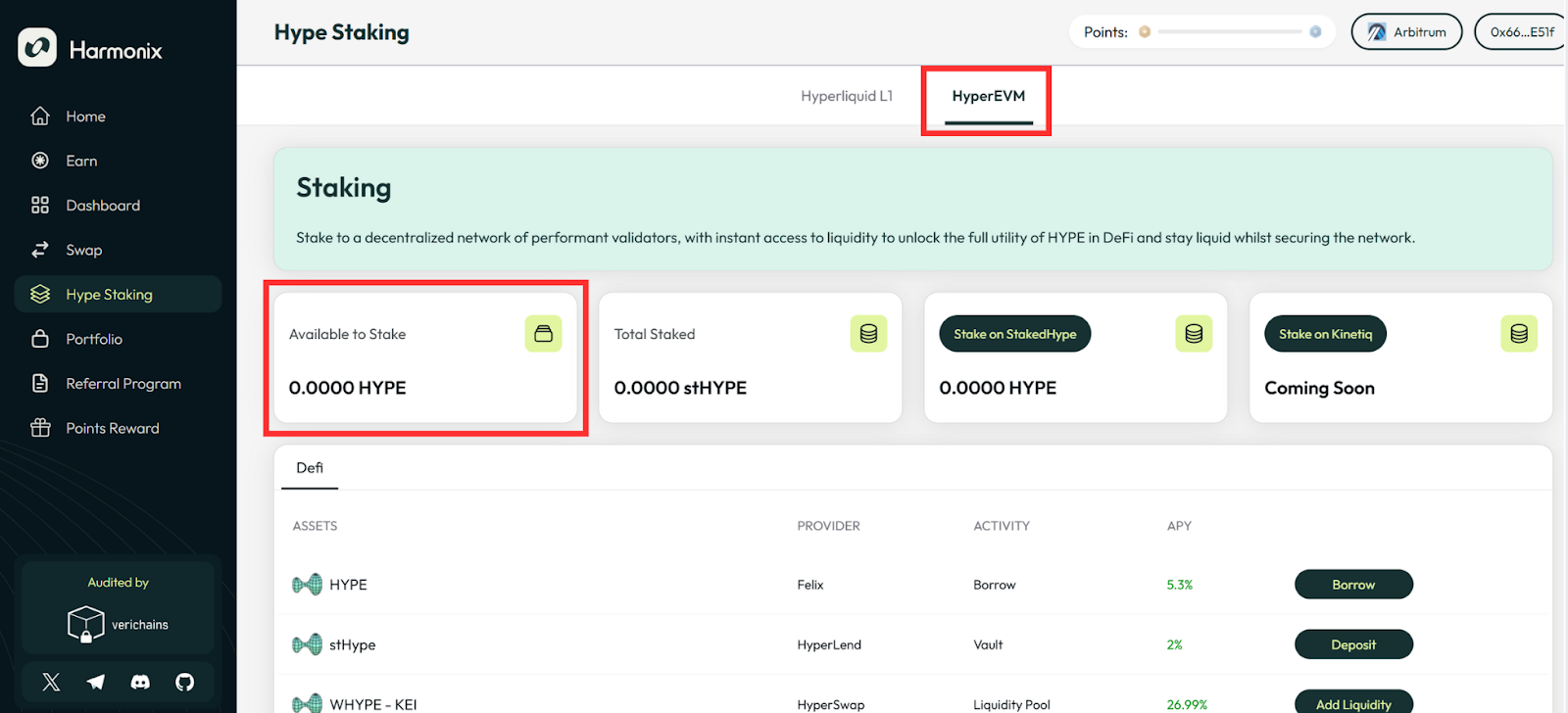
#### Step 4: Select HyperEVM and check the Staking Balance

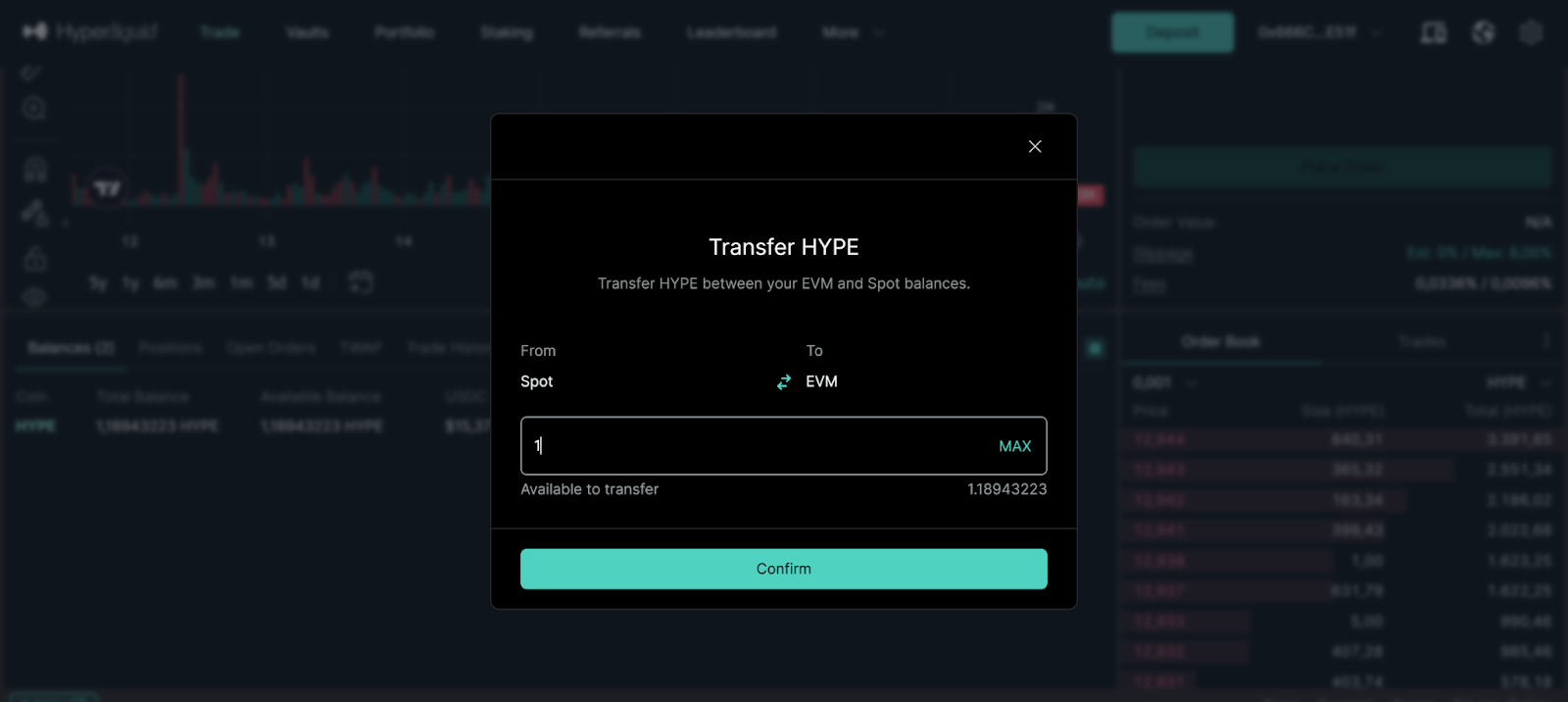
If the "Available to Stake" shows 0, visit <https://app.hyperliquid.xyz/> to transfer $HYPE from Hyperliquid L1 to HyperEVM.

<figure><img src="https://1987302139-files.gitbook.io/~/files/v0/b/gitbook-x-prod.appspot.com/o/spaces%2FhUFeSYPJDEOtT5FxR8pX%2Fuploads%2FgBkSOI4UQ7LePjLB9kF1%2F3.1.png?alt=media&#x26;token=67f9b3ee-e7ae-41a1-9fb1-ecc11afdd3bc" alt=""><figcaption></figcaption></figure>

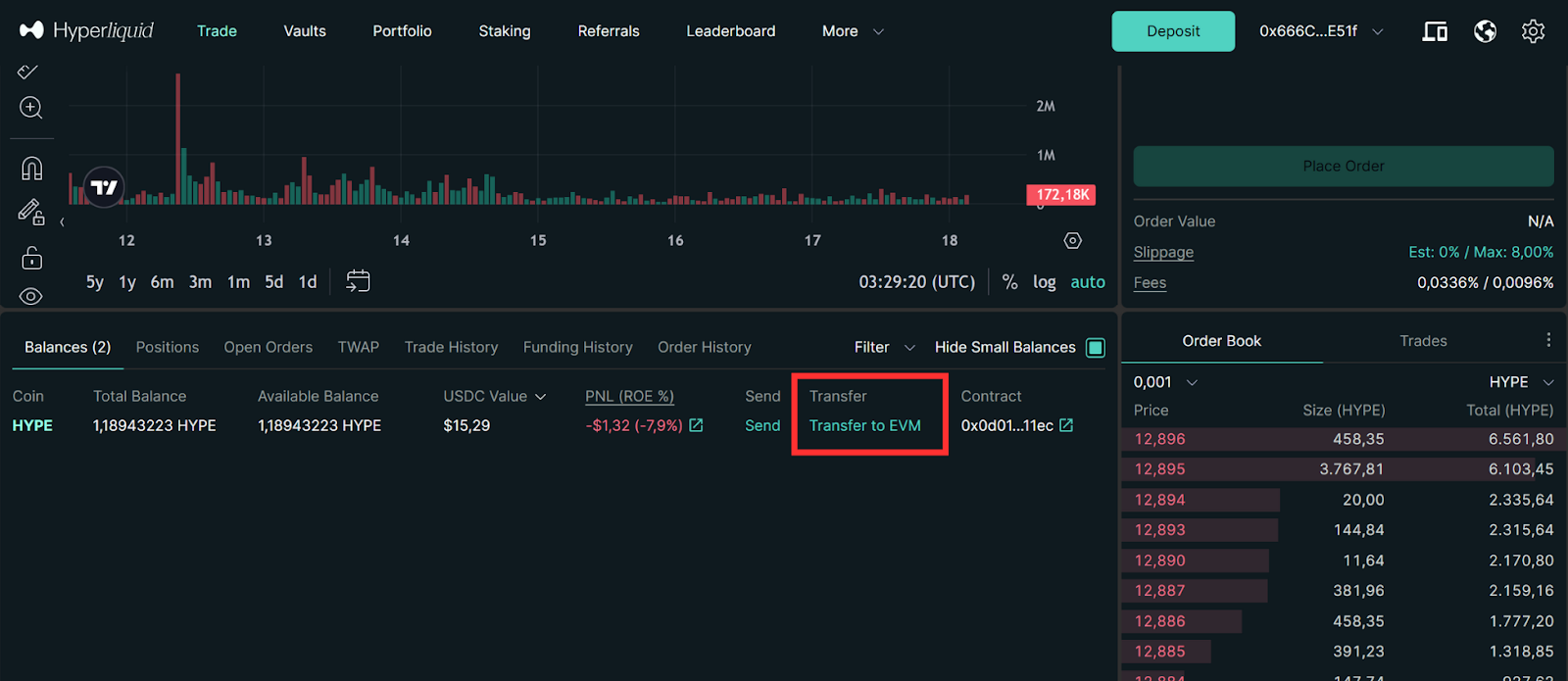
After connecting your wallet at <https://app.hyperliquid.xyz/>, click "Transfer to EVM" to move $HYPE from Hyperliquid L1 to HyperEVM.

<figure><img src="https://1987302139-files.gitbook.io/~/files/v0/b/gitbook-x-prod.appspot.com/o/spaces%2FhUFeSYPJDEOtT5FxR8pX%2Fuploads%2FEZWj97tlQKeFc9kbmg56%2F3.2.png?alt=media&#x26;token=e599540c-519b-4a82-8175-b49750dcd715" alt=""><figcaption></figcaption></figure>

Input the number of $HYPE you want to transfer.

<figure><img src="https://1987302139-files.gitbook.io/~/files/v0/b/gitbook-x-prod.appspot.com/o/spaces%2FhUFeSYPJDEOtT5FxR8pX%2Fuploads%2FhPOyVWzpbh48k2x3lqM4%2F3.3.png?alt=media&#x26;token=d82bd4a8-da0f-4407-b021-1d18d1c5da3d" alt=""><figcaption></figcaption></figure>

Return to the HyperEVM Staking section on Harmonix page and refresh it to check your Staking Balance under "Available to Stake."

<figure><img src="https://1987302139-files.gitbook.io/~/files/v0/b/gitbook-x-prod.appspot.com/o/spaces%2FhUFeSYPJDEOtT5FxR8pX%2Fuploads%2F5IvGKBJwhKznrhj8wJWT%2F3.4.png?alt=media&#x26;token=fca151bd-08b1-4a78-a46a-725c0fc443ba" alt=""><figcaption></figcaption></figure>

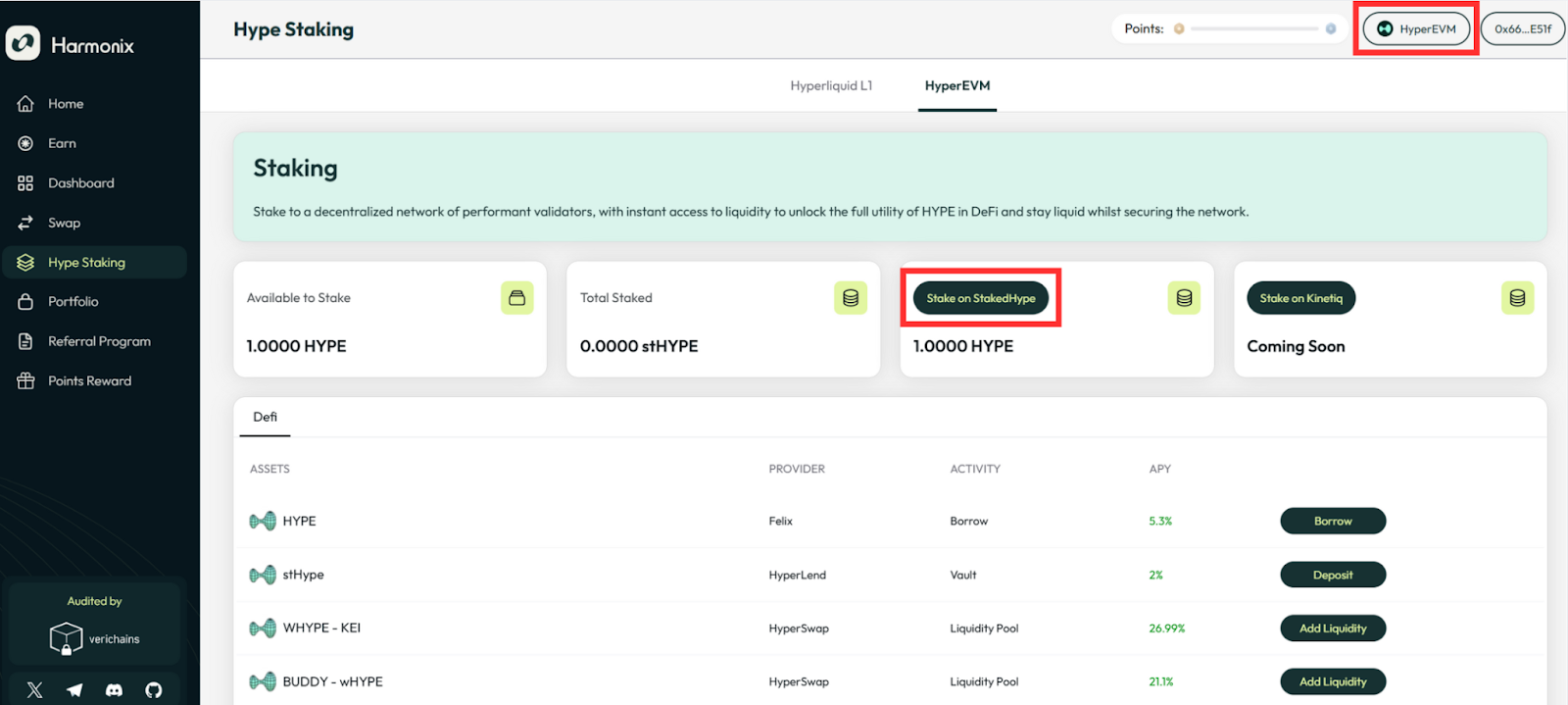
#### Step 5: Staking $HYPE on HyperEVM

Click the "Stake on StakedHype” button. Ensure that you have migrated your network to HyperEVM.

<figure><img src="https://1987302139-files.gitbook.io/~/files/v0/b/gitbook-x-prod.appspot.com/o/spaces%2FhUFeSYPJDEOtT5FxR8pX%2Fuploads%2FzSxaktLJeT6uOPXqEZyh%2F3.5.png?alt=media&#x26;token=50883d0a-be5c-433e-bf1d-c73441677a91" alt=""><figcaption></figcaption></figure>

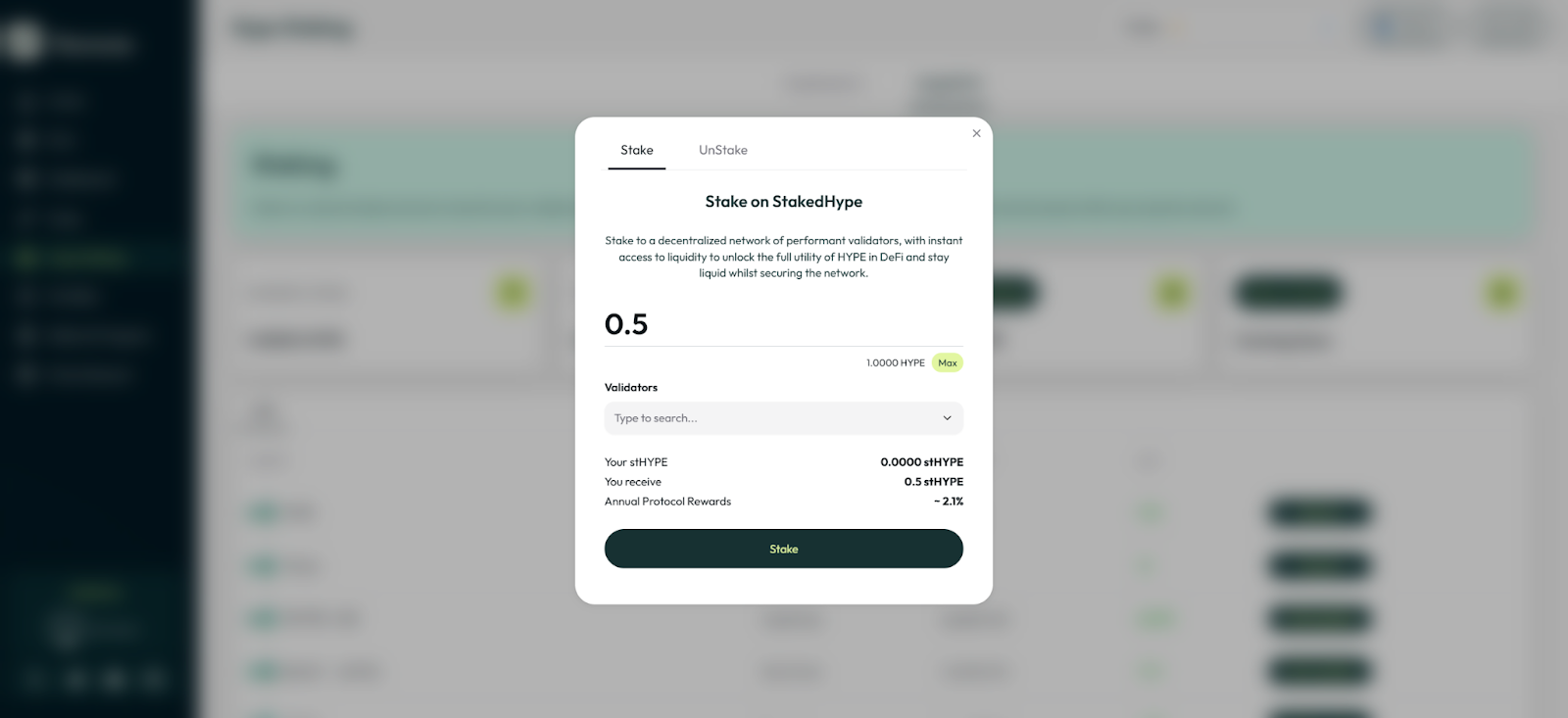
Input the number of $HYPE you want to stake.

<figure><img src="https://1987302139-files.gitbook.io/~/files/v0/b/gitbook-x-prod.appspot.com/o/spaces%2FhUFeSYPJDEOtT5FxR8pX%2Fuploads%2F3AFcj0b743gkS0iLvdjr%2F3.6.png?alt=media&#x26;token=21125255-08d0-460d-a80f-712388e11a0a" alt=""><figcaption></figcaption></figure>

Select your preferred validator and click the "Stake" button.

<figure><img src="https://1987302139-files.gitbook.io/~/files/v0/b/gitbook-x-prod.appspot.com/o/spaces%2FhUFeSYPJDEOtT5FxR8pX%2Fuploads%2F82fJOlwvmZJvcLy0RFGy%2F3.7.png?alt=media&#x26;token=91f3ded6-0d9c-4d45-9ad3-c80e41cf7bd7" alt=""><figcaption></figcaption></figure>

Check “Total Staked" to see if your balance is displayed correctly.

<figure><img src="https://1987302139-files.gitbook.io/~/files/v0/b/gitbook-x-prod.appspot.com/o/spaces%2FhUFeSYPJDEOtT5FxR8pX%2Fuploads%2FqZk4G0cQbE8BIdQSNI7B%2F3.8.png?alt=media&#x26;token=b4c77762-9c9b-4b30-b0b9-c2813aa64be2" alt=""><figcaption></figcaption></figure>

#### Step 6 (optional): Choose your next DeFi protocols to continue your journey

Please note that DeFi providers, including Felix and Hyperlend, have only launched their Testnet.

<figure><img src="https://1987302139-files.gitbook.io/~/files/v0/b/gitbook-x-prod.appspot.com/o/spaces%2FhUFeSYPJDEOtT5FxR8pX%2Fuploads%2F35sc5UjBsFF8Xj6uxS9j%2F3.9.png?alt=media&#x26;token=eb9a8be7-0888-400a-b0ab-3540e27c6db3" alt=""><figcaption></figcaption></figure>